
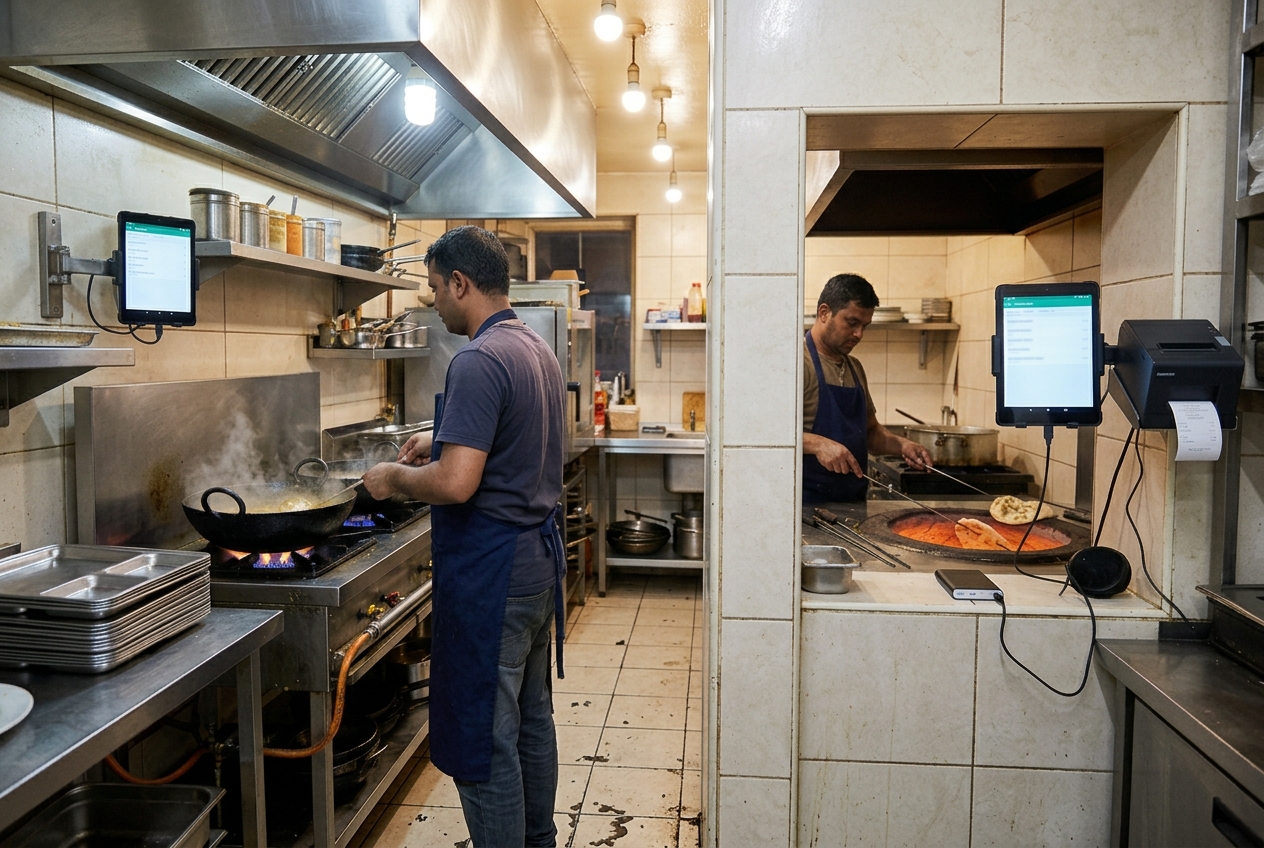
A split KOT keeps a multi-kitchen service from cooking off one crowded slip. Each station gets a kitchen order ticket for its own items, while the table stays one order and one bill. In Bangladesh that usually means a main kitchen plus a tandoor room, a Chinese wok line, or a bakery counter down the corridor. Riser POS sends kitchen tickets to a kitchen display. Each extra room still needs its own screen or printer, and a mixed table on install day is how you confirm the split.
Quick answer: A split KOT breaks one table order into separate kitchen tickets so each station cooks only its own items. Use it when grill, curry, tandoor, bakery, or drinks sit in different rooms. Riser POS sends tickets to a kitchen display. Give each station its own screen or printer, and test a mixed order before Friday service.
Written by Dimdul, House 10, Road 4, Kaderabad Housing, Mohammadpur, Dhaka-1207. Last updated: 7 October 2026.
What is a split KOT?
A split KOT is one guest order broken into separate kitchen order tickets by station. Curry, tandoor, bakery, and drinks each receive only the lines they fire, with the same table number and modifiers. The cashier still closes a single bill. Use it when those stations are not standing at the same pass.
KOT means kitchen order ticket: the slip or the screen line the cook fires. The guest receipt is a different piece of paper. It lists prices. The KOT lists food.
Splitting the bill divides what each guest pays. A split KOT divides the same order across kitchens. Riser POS can split a bill between customers. That control is for the cashier. Station tickets are a separate setup. Confirm both on one mixed table before you trust either.
Which restaurants should split kitchen tickets?
Split the ticket when two cooks cannot read the same spike without walking. A restaurant kitchen with a biryani pass in one room and a tandoor in another is the usual Dhaka case. A Chinese wok behind a second door is the same problem. A bakery counter plating firni should not wait for a shout from the curry line.
Keep one ticket when one person cooks and takes the money. A tea stall, a single-wok cafe, and many eight-seat bakeries fit that. See cafe, bakery, and tea stall POS.
A cloud kitchen splits the work differently. The cook fires items. The packer bags the whole order, so the pack ticket lists every item and the cook ticket lists only what that station fires. See cloud kitchen POS.
Two outlets are a different job from two rooms. Multi-location on the Riser POS page is a second branch with its own till and its own reports. Grill and bakery under one roof stay on one till, with a split KOT between stations.
How do you split one order across kitchens?
Turn one table order into a split KOT so each kitchen station receives only the items it fires, while the cashier keeps a single bill.
- Name the stations cooks already shout: Curry, Tandoor, Chinese, Bakery, Drinks
Name the stations cooks already shout: Curry, Tandoor, Chinese, Bakery, Drinks. One or two words. Skip a station you do not have.
- Give every menu item one station
Give every menu item one station. A plate two kitchens touch still needs one owner, plus a short note for the second cook. Two owners on one dish means it is fired twice or not at all.
- Enter the order once
Enter the order once. One table number, or one takeaway name. One bill. The cashier does not open a second order just to reach the tandoor.
- Send each station its own lines
Send each station its own lines. Same table number, same time, same modifiers (less spicy, no onion). The curry ticket leaves off the naan. The tandoor ticket leaves off the biryani.
- Hold the runner until every station on that table is clear
Hold the runner until every station on that table is clear. The pass, and the packer in a cloud kitchen, need the full check. A production station does not.
Write the station names where the roster is written. One person owns the pass. If two people edit the same ticket, a line vanishes. For shift habits, see managing restaurant staff.
What does each kitchen station need to see?
| On the ticket | Curry / grill | Tandoor or bakery | Pass or pack | Guest bill |
|---|---|---|---|---|
| Table or token number | Yes | Yes | Yes | Yes |
| Only this station’s items | Yes | Yes | No. The full check | No. The full order |
| Modifiers (“no onion”) | Yes | Yes | Yes | When they change the price |
| Other stations’ dishes | Leave them off | Leave them off | Yes, so the runner can wait | Yes |
| Price | Leave it off | Leave it off | Leave it off | Yes |
A cook who sees twenty lines from three kitchens will fire the wrong one in a Friday rush. A packer who sees only the curry lines will hand the rider a bag with no naan.
How does a split KOT compare with one shared ticket?
| One shared KOT | Split KOT | Shout from the pass | |
|---|---|---|---|
| Who reads it | Every station | The station that fires the line | Whoever is close enough |
| Biryani + naan + lassi | The curry cook hunts for one line | Each station sees its own lines | The naan is the item that gets missed |
| Modifiers | Buried under another station’s items | On that station’s ticket | Spoken once |
| Tandoor room down the corridor | A runner carries the full slip | That room has its own ticket or screen | The shout dies in the corridor |
| Guest bill | One bill | One bill | Often written twice |
| When the power drops | Paper still works | Paper backup at the station whose screen dies | Still works, and still misses items |
Keep a KDS as the main line and a paper KOT as the backup. That pairing is what survives a rush. One shared paper slip is the backup, not the system you want at 8pm.
How do multiple kitchens work with Riser POS?
Riser POS is Dimdul’s restaurant POS. The published kitchen tool is the kitchen display: counter staff take the order on Windows, Android, or a tablet, and the kitchen screen shows the ticket. KDS is part of the restaurant product.
A second room is a second screen or a second printer. It is not a second monthly fee. On install day, send one table with curry, naan, and a cold drink. Watch where each line appears. Ask Dimdul to show the tandoor screen before you mount a tablet in that room. A second tablet only helps if that station can read its own lines on it.
Cancel a naan after the ticket has gone. Then look at the tandoor screen or slip. If the old line is still there, the cook will still fire it. That check belongs in training, which is included in the ৳5,000 installation (published August 2026).
Aggregator apps stay in those apps. Riser POS has no published Foodpanda or Pathao ingest. A bag that should hit two stations has to be typed into the till first. If most of the night arrives that way, read the gap on the cloud kitchen page before you buy for that reason.
What hardware does a second kitchen need?
| Piece | Practical choice |
|---|---|
| Till | Phone, tablet, or Windows PC already running Riser POS |
| Each cooking station | One 8–10″ tablet on a stand, or one thermal printer |
| Pass or pack | The full check on a screen the runner can see |
| Power | A socket plus a small UPS or a power bank on the far station |
| Backup | One KOT printer that does not depend on the far room’s Wi-Fi |
Skip a second Windows PC for the tandoor unless that room already has one. The shopping list is restaurant POS hardware in Bangladesh. Riser POS lists thermal printers, Bluetooth printers, Android tablets, and Windows terminals. You buy the devices. The software price does not include them.
What should you test before service?
Run these on install day, with the cook who will actually work the far station:
- A dine-in table with items in two kitchens and a modifier on one of them.
- A takeaway with a guest name, so the packer is not guessing “the naan for table 4.”
- A void after send. Both stations must drop that line.
- One item that only the far station cooks, so you can see it never landed on the curry screen.
- The internet unplugged. Note which station still has the ticket.
Offline POS on Riser POS keeps essential selling on the till, then syncs when the connection returns. A kitchen screen or a network printer on a dead router does not get the new ticket. The far room needs paper, or a printer paired to the till device, for that hour. The unplug test is written up under offline restaurant POS. Setup order is in how Dimdul installs a restaurant POS.
What does a split KOT cost?
The software number Dimdul publishes (August 2026) stays one line for the whole site: ৳2,000 per month + ৳5,000 installation. The install includes domain, hosting, and training. A second kitchen does not add a second subscription. It adds a tablet or a printer you buy yourself. Year one for software and setup is ৳2,000 × 12 + ৳5,000 = ৳29,000, before hardware. Details: Riser POS price. There is no self-serve free trial.
WhatsApp a mixed-ticket demo: 01538-004738. Ask to see one table hit two stations. If both screens show the full slip and nobody can filter it, decide then whether the cooks will work that way.
Frequently asked questions
A split KOT is a kitchen order ticket for one station only. The guest order stays whole. Curry, tandoor, bakery, or drinks each see their own items, table number, and modifiers. The guest bill still lists the full order.
Splitting the bill divides payment between guests. A split KOT divides the same order across kitchens. Riser POS can split a bill between customers. Station tickets are a separate setup. Confirm both on a mixed table during installation.
Riser POS includes a kitchen display and supports thermal and Bluetooth printers. A second kitchen needs a second screen or printer. On install day, send one order with items from two stations and watch where each line shows. Dimdul’s training is part of the ৳5,000 installation fee.
One till, plus one screen or printer per station that is not standing at that till. A tablet on the curry pass and a tablet or KOT printer in the tandoor room is a working pair. The device is yours. The software price does not add a second subscription for the second screen.
A screen or network printer on a dead router does not get the ticket. Keep a paper KOT printer on the station furthest from the counter, on power that survives the cut, or pair it to the till device. Offline billing on Riser POS keeps the order on the till. It does not light a screen in another room by itself.
Next step
WhatsApp Dimdul for a Riser POS demo: 01538-004738. Send one table with biryani, naan, and a drink. Check the curry screen, the tandoor slip, and the bill. Three different views of one order is the test.
*Written by Dimdul, House 10, Road 4, Kaderabad Housing, Mohammadpur, Dhaka-1207. Last reviewed 7 October 2026. WhatsApp +880 1538-004738 · [email protected]*